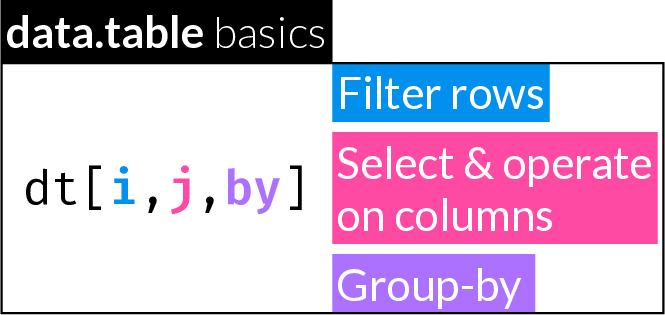
34 data.table basics
34.1 data.table extends the functionality of the data.frame
Some of the ways in which a data.table differs from a data.frame:
- Many operations can be performed within a
data.table’s “frame” (dt[i, j, by]): filter cases, select columns & operate on columns, group-by operations - Access column names directly without quoting
- Many operations can be performed “in-place” (i.e. with no assignment)
- Working on large datasets (e.g. millions of rows) can be orders of magnitude faster with a
data.tablethan adata.frame.
data.table operations remain as close as possible to data.frame operations, trying to extend rather than replace data.frame functionality.
data.table includes thorough and helpful error messages that often point to a solution. This includes common mistakes new users may make when trying commands that would work on a data.frame but not on a data.table.
34.1.1 Load the data.table package
Attaching package: 'data.table'The following object is masked from 'package:base':
%notin%
34.2 Create a data.table
34.2.1 By assignment: data.table()
Let’s create a data.frame and a data.table to explore side by side.
df <- data.frame(A = 1:5,
                 B = c(1.2, 4.3, 9.7, 5.6, 8.1),
                 C = c("a", "b", "b", "a", "a"))
class(df)
[1] "data.frame"df A B C
1 1 1.2 a
2 2 4.3 b
3 3 9.7 b
4 4 5.6 a
5 5 8.1 adata.table() syntax is similar to data.frame() (differs in some arguments)
dt <- data.table(A = 1:5,
                 B = c(1.2, 4.3, 9.7, 5.6, 8.1),
                 C = c("a", "b", "b", "a", "a"))
class(dt)
[1] "data.table" "data.frame"dt A B C
<int> <num> <char>
1: 1 1.2 a
2: 2 4.3 b
3: 3 9.7 b
4: 4 5.6 a
5: 5 8.1 aNotice how a data.table object also inherits from data.frame. This means that if a method does not exist for data.table, the method for data.frame will be used (See classes and generic functions).
As part of improving efficiency, data.tables do away with row names. Instead of using row names, you should use a dedicated column or column with a row identifier/s (e.g. “ID”). this is advisable when working with data.frames as well.
A rather convenient option is to have data.tables print each column’s class below the column name. You can pass the argument class = TRUE to print() or set the global option datatable.print.class using options()
options(datatable.print.class = TRUE)
dt
A B C
<int> <num> <char>
1: 1 1.2 a
2: 2 4.3 b
3: 3 9.7 b
4: 4 5.6 a
5: 5 8.1 aSame as with a data.frame, to automatically convert strings to factors, you can use the stringsAsFactors argument:
dt2 <- data.table(A = 1:5,
                  B = c(1.2, 4.3, 9.7, 5.6, 8.1),
                  C = c("a", "b", "b", "a", "a"),
                  stringsAsFactors = TRUE)
dt2
A B C
<int> <num> <fctr>
1: 1 1.2 a
2: 2 4.3 b
3: 3 9.7 b
4: 4 5.6 a
5: 5 8.1 a
34.2.2 By coercion: as.data.table()
dat <- data.frame(A = 1:5,
                  B = c(1.2, 4.3, 9.7, 5.6, 8.1),
                  C = c("a", "b", "b", "a", "a"),
                  stringsAsFactors = TRUE)
dat
A B C
1 1 1.2 a
2 2 4.3 b
3 3 9.7 b
4 4 5.6 a
5 5 8.1 adat2 <- as.data.table(dat)
dat2 A B C
<int> <num> <fctr>
1: 1 1.2 a
2: 2 4.3 b
3: 3 9.7 b
4: 4 5.6 a
5: 5 8.1 a
34.2.3 By coercion in-place: setDT()
setDT() converts a list or data.frame into a data.table in-place. This means the object passed to setDT() is changed and you do not need to assign the output to a new object.
dat <- data.frame(A = 1:5,
                  B = c(1.2, 4.3, 9.7, 5.6, 8.1),
                  C = c("a", "b", "b", "a", "a"))
class(dat)
[1] "data.frame"You can similarly convert a data.table to a data.frame, in-place:
34.3 Display data.table structure with str()
str() works the same (and you should keep using it!)
str(df)'data.frame': 5 obs. of 3 variables:
$ A: int 1 2 3 4 5
$ B: num 1.2 4.3 9.7 5.6 8.1
$ C: chr "a" "b" "b" "a" ...str(dt)Classes 'data.table' and 'data.frame': 5 obs. of 3 variables:
$ A: int 1 2 3 4 5
$ B: num 1.2 4.3 9.7 5.6 8.1
$ C: chr "a" "b" "b" "a" ...
- attr(*, ".internal.selfref")=<pointer: 0x101fb8f30>
34.4 Combine data.tables
cbind() and rbind() work on data.tables the same as on data.frames:
dt1 <- data.table(a = 1:5)
dt2 <- data.table(b = 11:15)
cbind(dt1, dt2)
a b
<int> <int>
1: 1 11
2: 2 12
3: 3 13
4: 4 14
5: 5 15rbind(dt1, dt1) a
<int>
1: 1
2: 2
3: 3
4: 4
5: 5
6: 1
7: 2
8: 3
9: 4
10: 534.5 Set column names in-place
dta <- data.table(
  ID = sample(8000:9000, size = 10),
  A = rnorm(10, mean = 47, sd = 8),
  W = rnorm(10, mean = 87, sd = 7)
)
dta
ID A W
<int> <num> <num>
1: 8314 46.62604 86.63428
2: 8212 57.39012 80.97981
3: 8272 57.76264 83.02919
4: 8722 37.46892 87.73232
5: 8354 65.94334 87.02533
6: 8798 45.52320 97.25181
7: 8372 40.92539 78.13801
8: 8400 67.55367 72.44462
9: 8865 39.01626 84.40141
10: 8284 36.41178 100.69017Use the syntax:
setnames(dt, old, new)
to change the column names of a data.table in-place.
Changes all column names:
    Patient_ID      Age    Weight
         <int>    <num>     <num>
 1:       8314 46.62604  86.63428
 2:       8212 57.39012  80.97981
 3:       8272 57.76264  83.02919
 4:       8722 37.46892  87.73232
 5:       8354 65.94334  87.02533
 6:       8798 45.52320  97.25181
 7:       8372 40.92539  78.13801
 8:       8400 67.55367  72.44462
 9:       8865 39.01626  84.40141
10:       8284 36.41178 100.69017
Change subset of names:
    Patient_ID Age_at_Admission Weight_at_Admission
         <int>            <num>               <num>
 1:       8314         46.62604            86.63428
 2:       8212         57.39012            80.97981
 3:       8272         57.76264            83.02919
 4:       8722         37.46892            87.73232
 5:       8354         65.94334            87.02533
 6:       8798         45.52320            97.25181
 7:       8372         40.92539            78.13801
 8:       8400         67.55367            72.44462
 9:       8865         39.01626            84.40141
10:       8284         36.41178           100.69017
old argument can also be integer index of column(s).
For example, change the name of the first column:
setnames(dta, 1, "Hospital_ID")
dta
Hospital_ID Age_at_Admission Weight_at_Admission
<int> <num> <num>
1: 8314 46.62604 86.63428
2: 8212 57.39012 80.97981
3: 8272 57.76264 83.02919
4: 8722 37.46892 87.73232
5: 8354 65.94334 87.02533
6: 8798 45.52320 97.25181
7: 8372 40.92539 78.13801
8: 8400 67.55367 72.44462
9: 8865 39.01626 84.40141
10: 8284 36.41178 100.6901734.6 Filter rows
There are many similarities and some notable differences in how indexing works in a data.table vs. a data.frame.
Filtering rows with an integer or logical index is largely the same in a data.frame and a data.table, but in a data.table you can omit the comma to select all columns:
df[c(1, 3, 5), ] A B C
1 1 1.2 a
3 3 9.7 b
5 5 8.1 adt[c(1, 3, 5), ] A B C
<int> <num> <char>
1: 1 1.2 a
2: 3 9.7 b
3: 5 8.1 adt[c(1, 3, 5)] A B C
<int> <num> <char>
1: 1 1.2 a
2: 3 9.7 b
3: 5 8.1 aUsing a variable that holds a row index, whether integer or logical:
rowid <- c(1, 3, 5)
df[rowid, ]
A B C
1 1 1.2 a
3 3 9.7 b
5 5 8.1 adt[rowid, ] A B C
<int> <num> <char>
1: 1 1.2 a
2: 3 9.7 b
3: 5 8.1 adt[rowid] A B C
<int> <num> <char>
1: 1 1.2 a
2: 3 9.7 b
3: 5 8.1 arowbn <- c(T, F, T, F, T)
df[rowbn, ] A B C
1 1 1.2 a
3 3 9.7 b
5 5 8.1 adt[rowbn, ] A B C
<int> <num> <char>
1: 1 1.2 a
2: 3 9.7 b
3: 5 8.1 adt[rowbn] A B C
<int> <num> <char>
1: 1 1.2 a
2: 3 9.7 b
3: 5 8.1 a34.6.1 Conditional filtering
As a reminder, there are a few ways to conditionally filter cases in a data.frame:
  A   B C
5 5 8.1 a A B C
5 5 8.1 a A B C
5 5 8.1 adata.table allows you to refer to column names directly and unquoted, which makes writing filter conditions easier/more compact:
The data.table package also includes an S3 method for subset() that works the same way as with a data.frame:
As another example, exclude cases based on missingness in a specific column:
adf <- as.data.frame(sapply(1:5, function(i) rnorm(10)))
adf |> head()
V1 V2 V3 V4 V5
1 2.22029573 -1.6899860 1.0169091 -0.40533120 -1.00214779
2 0.60818512 0.6662469 -0.4782011 0.36760585 1.01787556
3 -0.06685764 0.6327936 2.5952876 -0.44703312 -0.01873616
4 -0.71955229 -1.3725172 0.3105270 -0.09870917 0.35707155
5 -1.15751416 -0.5501634 -0.9493526 0.36300982 0.46864535
6 -1.06586012 0.4438260 0.2842825 -0.48265981 -0.70218181adf[1, 3] <- adf[3, 4] <- adf[5, 3] <- adf[7, 3] <- NA
adt <- as.data.table(adf)adf[!is.na(adf$V3), ] V1 V2 V3 V4 V5
2 0.60818512 0.6662469 -0.4782011 0.36760585 1.01787556
3 -0.06685764 0.6327936 2.5952876 NA -0.01873616
4 -0.71955229 -1.3725172 0.3105270 -0.09870917 0.35707155
6 -1.06586012 0.4438260 0.2842825 -0.48265981 -0.70218181
8 0.25864974 1.4099975 -0.6980755 -0.73077795 -0.42766765
9 -0.32451902 0.1811933 -0.4704955 -0.72303551 -0.36097126
10 -0.54862145 0.5148588 -1.0047524 0.23734835 0.13083037adt[!is.na(V3)] V1 V2 V3 V4 V5
<num> <num> <num> <num> <num>
1: 0.60818512 0.6662469 -0.4782011 0.36760585 1.01787556
2: -0.06685764 0.6327936 2.5952876 NA -0.01873616
3: -0.71955229 -1.3725172 0.3105270 -0.09870917 0.35707155
4: -1.06586012 0.4438260 0.2842825 -0.48265981 -0.70218181
5: 0.25864974 1.4099975 -0.6980755 -0.73077795 -0.42766765
6: -0.32451902 0.1811933 -0.4704955 -0.72303551 -0.36097126
7: -0.54862145 0.5148588 -1.0047524 0.23734835 0.1308303734.7 Select columns
34.7.1 By position(s)
Selecting a single column in data.table does not drop to a vector, similar to using drop = FALSE in a data.frame:
df[, 1][1] 1 2 3 4 5df[, 1, drop = FALSE] A
1 1
2 2
3 3
4 4
5 5dt[, 1] A
<int>
1: 1
2: 2
3: 3
4: 4
5: 5Double bracket indexing of a single column works the same on a data.frame and a data.table, returning a vector:
df[[2]][1] 1.2 4.3 9.7 5.6 8.1dt[[2]][1] 1.2 4.3 9.7 5.6 8.1A vector of column positions returns a smaller data.table, similar to how it returns a smaller data.frame :
34.7.2 By name(s)
In data.table, you access column names directly without quoting or using the $ notation:
df[, "B"][1] 1.2 4.3 9.7 5.6 8.1df$B[1] 1.2 4.3 9.7 5.6 8.1dt[, B][1] 1.2 4.3 9.7 5.6 8.1Because of this, data.table requires a slightly different syntax to use a variable as a column index which can contain integer positions, logical index, or column names. While on a data.frame you can do pass an index vector directly:
  A   B
1 1 1.2
2 2 4.3
3 3 9.7
4 4 5.6
5 5 8.1df[, colbn] B C
1 1.2 a
2 4.3 b
3 9.7 b
4 5.6 a
5 8.1 adf[, colnm] A C
1 1 a
2 2 b
3 3 b
4 4 a
5 5 aTo do the same in a data.table, you must prefix the index vector with two dots:
dt[, ..colid] A B
<int> <num>
1: 1 1.2
2: 2 4.3
3: 3 9.7
4: 4 5.6
5: 5 8.1dt[, ..colbn] B C
<num> <char>
1: 1.2 a
2: 4.3 b
3: 9.7 b
4: 5.6 a
5: 8.1 adt[, ..colnm] A C
<int> <char>
1: 1 a
2: 2 b
3: 3 b
4: 4 a
5: 5 aThink of working inside the data.table frame (i.e. within the “[…]”) like an environment: you have direct access to the variables, i.e. columns within it. If you want to refer to variables outside the data.table, you must prefix their names with .. (similar to how you access the directory above your current working directory in the system shell).
Always read error messages carefully, no matter what function or package you are using. In the case of data.table, the error messages are very informative and often point to the solution.
See what happens if you try to use the data.frame syntax by accident:
dt[, colid]Error in `[.data.table`:
! j (the 2nd argument inside [...]) is a single symbol but column name 'colid' is not found. If you intended to select columns using a variable in calling scope, please try DT[, ..colid]. The .. prefix conveys one-level-up similar to a file system path.
Selecting a single column by name returns a vector:
dt[, A][1] 1 2 3 4 5Selecting one or more columns by name enclosed in list() or .() (which, in this case, is short for list()), always returns a data.table:
dt[, .(A)] A
<int>
1: 1
2: 2
3: 3
4: 4
5: 5dt[, .(A, B)] A B
<int> <num>
1: 1 1.2
2: 2 4.3
3: 3 9.7
4: 4 5.6
5: 5 8.1
34.7.3 .SD & .SDcols
.SDcols is a special symbol that can be used to select columns of a data.table as an alternative to j. It can accept a vector of integer positions or column names. .SD is another special symbol that can be used in j and refers to either the entire data.table, or the subset defined by .SDcols, if present. The following can be used to select columns:
dt[, .SD, .SDcols = colid] A B
<int> <num>
1: 1 1.2
2: 2 4.3
3: 3 9.7
4: 4 5.6
5: 5 8.1One of the main uses of .SD is shown below in combination with lapply().
34.8 Add new column in-place
Use := assignment to add a new column in the existing data.table.
dt[, AplusB := A + B]
dt
A B C AplusB
<int> <num> <char> <num>
1: 1 1.2 a 2.2
2: 2 4.3 b 6.3
3: 3 9.7 b 12.7
4: 4 5.6 a 9.6
5: 5 8.1 a 13.1Note how dt was modified even though we did not run dt <- dt[, AplusB := A + B]
let() can also be use for in-place assignment (it uses := internally)
dt[, let(AplusB = A + B)]34.9 Add multiple columns in-place
You can add multiple new columns in-place and at the same time using the := operator with:
- a character vector of new column names on the left hand side
- a list of values on the right hand side
Here, we add two new columns, AtimesB and AoverB:
It is often convenient to use lapply() on the right hand side, since it always returns a list:
       A     B      C AplusB AtimesB    AoverB      logA      logB
   <int> <num> <char>  <num>   <num>     <num>     <num>     <num>
1:     1   1.2      a    2.2     1.2 0.8333333 0.0000000 0.1823216
2:     2   4.3      b    6.3     8.6 0.4651163 0.6931472 1.4586150
3:     3   9.7      b   12.7    29.1 0.3092784 1.0986123 2.2721259
4:     4   5.6      a    9.6    22.4 0.7142857 1.3862944 1.7227666
5:     5   8.1      a   13.1    40.5 0.6172840 1.6094379 2.0918641
You can also use the “functional form” of :=, resulting in a little more awkward syntax:
dt[, `:=`(AminusB = A - B, AoverC = A / B)]
dt
A B C AplusB AtimesB AoverB logA logB AminusB
<int> <num> <char> <num> <num> <num> <num> <num> <num>
1: 1 1.2 a 2.2 1.2 0.8333333 0.0000000 0.1823216 -0.2
2: 2 4.3 b 6.3 8.6 0.4651163 0.6931472 1.4586150 -2.3
3: 3 9.7 b 12.7 29.1 0.3092784 1.0986123 2.2721259 -6.7
4: 4 5.6 a 9.6 22.4 0.7142857 1.3862944 1.7227666 -1.6
5: 5 8.1 a 13.1 40.5 0.6172840 1.6094379 2.0918641 -3.1
AoverC
<num>
1: 0.8333333
2: 0.4651163
3: 0.3092784
4: 0.7142857
5: 0.6172840let() is equivalent and offers a cleaner syntax:
dt[, let(
  AminusB = A - B,
  AoverC = A / B)]
dt
A B C AplusB AtimesB AoverB logA logB AminusB
<int> <num> <char> <num> <num> <num> <num> <num> <num>
1: 1 1.2 a 2.2 1.2 0.8333333 0.0000000 0.1823216 -0.2
2: 2 4.3 b 6.3 8.6 0.4651163 0.6931472 1.4586150 -2.3
3: 3 9.7 b 12.7 29.1 0.3092784 1.0986123 2.2721259 -6.7
4: 4 5.6 a 9.6 22.4 0.7142857 1.3862944 1.7227666 -1.6
5: 5 8.1 a 13.1 40.5 0.6172840 1.6094379 2.0918641 -3.1
AoverC
<num>
1: 0.8333333
2: 0.4651163
3: 0.3092784
4: 0.7142857
5: 0.617284034.10 Convert column type
34.10.1 Assignment by reference with :=
Use any base R coercion function (as.*) to convert a column in-place using the := notation
dt[, A := as.numeric(A)]
dt
A B C AplusB AtimesB AoverB logA logB AminusB
<num> <num> <char> <num> <num> <num> <num> <num> <num>
1: 1 1.2 a 2.2 1.2 0.8333333 0.0000000 0.1823216 -0.2
2: 2 4.3 b 6.3 8.6 0.4651163 0.6931472 1.4586150 -2.3
3: 3 9.7 b 12.7 29.1 0.3092784 1.0986123 2.2721259 -6.7
4: 4 5.6 a 9.6 22.4 0.7142857 1.3862944 1.7227666 -1.6
5: 5 8.1 a 13.1 40.5 0.6172840 1.6094379 2.0918641 -3.1
AoverC
<num>
1: 0.8333333
2: 0.4651163
3: 0.3092784
4: 0.7142857
5: 0.6172840
34.10.2 Delete columns in-place with :=
To delete a column, use := to set it to NULL:
dt[, AoverB := NULL]
dt
A B C AplusB AtimesB logA logB AminusB AoverC
<num> <num> <char> <num> <num> <num> <num> <num> <num>
1: 1 1.2 a 2.2 1.2 0.0000000 0.1823216 -0.2 0.8333333
2: 2 4.3 b 6.3 8.6 0.6931472 1.4586150 -2.3 0.4651163
3: 3 9.7 b 12.7 29.1 1.0986123 2.2721259 -6.7 0.3092784
4: 4 5.6 a 9.6 22.4 1.3862944 1.7227666 -1.6 0.7142857
5: 5 8.1 a 13.1 40.5 1.6094379 2.0918641 -3.1 0.6172840Delete multiple columns
dt[, c("logA", "logB") := NULL]Or:
dt[, `:=`(AplusB = NULL, AminusB = NULL)]
dt
A B C AtimesB AoverC
<num> <num> <char> <num> <num>
1: 1 1.2 a 1.2 0.8333333
2: 2 4.3 b 8.6 0.4651163
3: 3 9.7 b 29.1 0.3092784
4: 4 5.6 a 22.4 0.7142857
5: 5 8.1 a 40.5 0.6172840
34.10.3 Fast loop-able assignment with set()
data.table’s set() is a loop-able version of the := operator. Use it in a for loop to operate on multiple columns.
Syntax: set(dt, i, j, value)
-
dtthe data.table to operate on -
ioptionally define which rows to operate on.i = NULLto operate on all rows -
jcolumn names or index to be assignedvalue -
valuevalues to be assigned tojby reference
As a simple example, transform the first two columns in-place by squaring:
for (i in 1:2) {
  set(dt, i = NULL, j = i, value = dt[[i]]^2)
}
34.11 Summarize
You can apply one or multiple summary functions on one or multiple columns. Surround the operations in list() or .() to output a new data.table holding the outputs of the operations, i.e. the input data.table remains unchanged.
   A_max A_min    A_sd
   <num> <num>   <num>
1:    25     1 9.66954
Example: Get the standard deviation of all numeric columns:
         A        B  AtimesB    AoverC
     <num>    <num>    <num>     <num>
1: 9.66954 37.35521 15.74462 0.2060219
If your function returns more than one value, the output will have multiple rows:
dt_range <- dt[, lapply(.SD, range), .SDcols = numid]
dt_range
A B AtimesB AoverC
<num> <num> <num> <num>
1: 1 1.44 1.2 0.3092784
2: 25 94.09 40.5 0.833333334.12 Set order
You can set the row order of a data.table in-place based on one or multiple columns’ values using setorder()
    PatientID   Height   Weight  Group
        <int>    <num>    <num> <fctr>
 1:      9574 186.1528 70.99249      A
 2:      1096 163.6788 79.54550      A
 3:      7087 150.9677 74.72518      A
 4:      2984 186.2628 83.79853      B
 5:      4221 164.4472 67.15947      B
 6:      6022 181.5310 65.79827      A
 7:      5723 168.3349 79.37818      B
 8:      2973 175.3880 90.04262      B
 9:      7544 172.2085 73.67249      B
10:      4297 183.1400 91.44823      B
Let’s set the order by PatientID:
setorder(dt, PatientID)
dt
PatientID Height Weight Group
<int> <num> <num> <fctr>
1: 1096 163.6788 79.54550 A
2: 2973 175.3880 90.04262 B
3: 2984 186.2628 83.79853 B
4: 4221 164.4472 67.15947 B
5: 4297 183.1400 91.44823 B
6: 5723 168.3349 79.37818 B
7: 6022 181.5310 65.79827 A
8: 7087 150.9677 74.72518 A
9: 7544 172.2085 73.67249 B
10: 9574 186.1528 70.99249 ALet’s re-order, always in-place, by group and then by height:
setorder(dt, Group, Height)
dt
PatientID Height Weight Group
<int> <num> <num> <fctr>
1: 7087 150.9677 74.72518 A
2: 1096 163.6788 79.54550 A
3: 6022 181.5310 65.79827 A
4: 9574 186.1528 70.99249 A
5: 4221 164.4472 67.15947 B
6: 5723 168.3349 79.37818 B
7: 7544 172.2085 73.67249 B
8: 2973 175.3880 90.04262 B
9: 4297 183.1400 91.44823 B
10: 2984 186.2628 83.79853 B34.13 Group-by operations
Up to now, we have learned how to use the data.table frame dat[i, j] to filter cases in i or add/remove/transform columns in-place in j. dat[i, j, by] allows to perform operations separately on groups of cases.
dt <- data.table(A = 1:5,
                 B = c(1.2, 4.3, 9.7, 5.6, 8.1),
                 C = rnorm(5),
                 Group = c("a", "b", "b", "a", "a"))
dt
A B C Group
<int> <num> <num> <char>
1: 1 1.2 -0.24685373 a
2: 2 4.3 -0.26137790 b
3: 3 9.7 -0.04257556 b
4: 4 5.6 -0.93981481 a
5: 5 8.1 -1.09627225 a34.13.1 Group-by summary
As we’ve seen, using .() or list() in j, returns a new data.table:
34.13.2 Group-by operation and assignment
Making an assignment with := in j, adds a column in-place. If you combine such an assignment with a group-by operation, the same value will be assigned to all cases of the group:
dt[, mean_A_by_Group := mean(A), by = Group]
dt
A B C Group mean_A_by_Group
<int> <num> <num> <char> <num>
1: 1 1.2 -0.24685373 a 3.333333
2: 2 4.3 -0.26137790 b 2.500000
3: 3 9.7 -0.04257556 b 2.500000
4: 4 5.6 -0.93981481 a 3.333333
5: 5 8.1 -1.09627225 a 3.33333334.14 Apply functions to columns
Any function that returns a list can be used in j to return a new data.table - therefore lapply is perfect for getting summary on multiple columns. This is another example where you have to use the .SD notation:
dt1 <- as.data.table(sapply(1:3, \(i) rnorm(10)))
dt1
V1 V2 V3
<num> <num> <num>
1: 1.1059941 0.87426654 0.6141060
2: 0.4395668 -0.20071727 1.7242426
3: -2.0820269 -0.92523676 0.9468652
4: -0.9440519 -1.60966406 1.1494512
5: -0.1435668 0.39225926 -1.6321830
6: 0.2265342 0.55815288 -0.8124152
7: -0.3215286 0.59037148 0.3293494
8: -0.8714006 1.72316821 -0.3033587
9: 0.5967716 -0.04003315 1.2246922
10: -0.3250293 2.27594053 1.1597659 Alpha Beta Gamma
<num> <num> <num>
1: -0.2318737 0.3638508 0.4400516You can specify which columns to operate on using the .SDcols argument:
dt2 <- data.table(A = 1:5,
                  B = c(1.2, 4.3, 9.7, 5.6, 8.1),
                  C = rnorm(5),
                  Group = c("a", "b", "b", "a", "a"))
dt2
A B C Group
<int> <num> <num> <char>
1: 1 1.2 -0.2801253 a
2: 2 4.3 0.4397270 b
3: 3 9.7 -1.3858568 b
4: 4 5.6 0.8397955 a
5: 5 8.1 1.5579884 adt2[, lapply(.SD, mean), .SDcols = 1:2] A B
<num> <num>
1: 3 5.78 A B
<num> <num>
1: 3 5.78 A B
<num> <num>
1: 3 5.78You can combine .SDcols and by:
    Group     B          C
   <char> <num>      <num>
1:      a   5.6  0.8397955
2:      b   7.0 -0.4730649
Create multiple new columns from transformation of existing and store with custom prefix:
dt1 Alpha Beta Gamma
<num> <num> <num>
1: 1.1059941 0.87426654 0.6141060
2: 0.4395668 -0.20071727 1.7242426
3: -2.0820269 -0.92523676 0.9468652
4: -0.9440519 -1.60966406 1.1494512
5: -0.1435668 0.39225926 -1.6321830
6: 0.2265342 0.55815288 -0.8124152
7: -0.3215286 0.59037148 0.3293494
8: -0.8714006 1.72316821 -0.3033587
9: 0.5967716 -0.04003315 1.2246922
10: -0.3250293 2.27594053 1.1597659 Alpha Beta Gamma Alpha_abs Beta_abs Gamma_abs
<num> <num> <num> <num> <num> <num>
1: 1.1059941 0.87426654 0.6141060 1.1059941 0.87426654 0.6141060
2: 0.4395668 -0.20071727 1.7242426 0.4395668 0.20071727 1.7242426
3: -2.0820269 -0.92523676 0.9468652 2.0820269 0.92523676 0.9468652
4: -0.9440519 -1.60966406 1.1494512 0.9440519 1.60966406 1.1494512
5: -0.1435668 0.39225926 -1.6321830 0.1435668 0.39225926 1.6321830
6: 0.2265342 0.55815288 -0.8124152 0.2265342 0.55815288 0.8124152
7: -0.3215286 0.59037148 0.3293494 0.3215286 0.59037148 0.3293494
8: -0.8714006 1.72316821 -0.3033587 0.8714006 1.72316821 0.3033587
9: 0.5967716 -0.04003315 1.2246922 0.5967716 0.04003315 1.2246922
10: -0.3250293 2.27594053 1.1597659 0.3250293 2.27594053 1.1597659dt2 A B C Group
<int> <num> <num> <char>
1: 1 1.2 -0.2801253 a
2: 2 4.3 0.4397270 b
3: 3 9.7 -1.3858568 b
4: 4 5.6 0.8397955 a
5: 5 8.1 1.5579884 a A B C Group A_groupMean C_groupMean
<int> <num> <num> <char> <num> <num>
1: 1 1.2 -0.2801253 a 3.333333 0.7058862
2: 2 4.3 0.4397270 b 2.500000 -0.4730649
3: 3 9.7 -1.3858568 b 2.500000 -0.4730649
4: 4 5.6 0.8397955 a 3.333333 0.7058862
5: 5 8.1 1.5579884 a 3.333333 0.705886234.15 Row-wise operations
dt <- data.table(a = 1:5, b = 11:15, c = 21:25,
                 d = 31:35, e = 41:45)
dt
a b c d e
<int> <int> <int> <int> <int>
1: 1 11 21 31 41
2: 2 12 22 32 42
3: 3 13 23 33 43
4: 4 14 24 34 44
5: 5 15 25 35 45To operate row-wise, we can use by = 1:nrow(dt). For example, to add a column, in-place, with row-wise sums of variables b through d:
34.16 Watch out for data.table error messages
For example