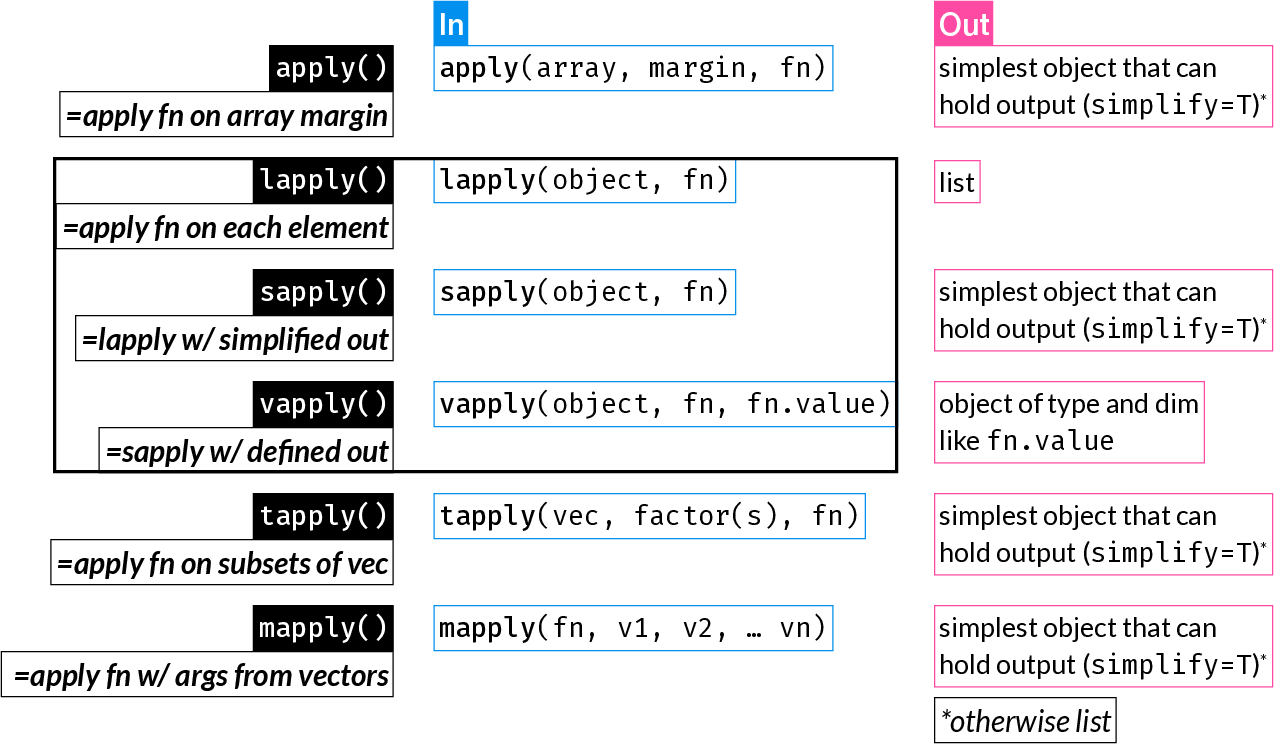
*apply() function family summary (Best to read through this chapter first and then refer back to this figure)
The apply functions are some of the most widely used R functions. They replace longer expressions created with a for loop, for example.
They can result in more compact and readable code.
| Function | Description |
|---|---|
apply() |
Apply function over array margins (i.e. over one or more dimensions) |
lapply() |
Return a list where each element is the result of applying a function to each element of the input |
sapply() |
Same as lapply(), but returns the simplest possible R object (instead of always returning a list) |
vapply() |
Same as sapply(), but with a pre-specified return type: this is safer and may also be faster |
tapply() |
Apply a function to elements of groups defined by a factor |
mapply() |
Multivariate sapply(): Apply a function using the 1st elements of the inputs vectors, then using the 2nd, 3rd, etc. |
*apply() function family summary (Best to read through this chapter first and then refer back to this figure)
apply()
apply() applies a function over one or more dimensions of an array of 2 dimensions or more (this includes matrices) or a data frame:
apply(array, MARGIN, FUN)
MARGIN can be an integer vector or character indicating the dimensions over which ‘FUN’ will be applied.
By convention, rows come first (just like in indexing), therefore:
MARGIN = 1: apply function on each row
MARGIN = 2: apply function on each column
Let’s create an example dataset:
       Age   Weight   Height      SBP
1 42.38150 70.51267 1.713957 138.1742
2 45.13493 67.14017 1.894886 133.3238
3 47.95814 74.64788 1.891844 132.6210
4 38.35157 87.52953 1.647567 138.6056
5 37.78304 92.54704 1.881676 136.4991
6 27.96021 78.41965 1.765751 140.7869
Let’s calculate the mean value of each column:
dat_column_mean <- apply(dat, MARGIN = 2, FUN = mean)
dat_column_mean
Age Weight Height SBP
43.960451 80.670936 1.687325 134.743408 Hint: It is possibly easiest to think of the “MARGIN” as the dimension you want to keep.
In the above case, we want the mean for each variable, i.e. we want to keep columns and collapse rows.
Purely as an example to understand what apply() does, here is the equivalent procedure using a for-loop. You notice how much more code is needed, and why apply() and similar functions might be very convenient for many different tasks.
       Age     Weight     Height        SBP
43.960451 80.670936 1.687325 134.743408 Let’s create a different example dataset, where we record weight at multiple timepoints:
dat2 <- data.frame(ID = seq(8001, 8020),
                   Weight_week_1 = rnorm(20, mean = 110, sd = 10))
dat2[["Weight_week_3"]] <- dat2[["Weight_week_1"]] + rnorm(20, mean = -2, sd = 1)
dat2[["Weight_week_5"]] <- dat2[["Weight_week_3"]] + rnorm(20, mean = -3, sd = 1.1)
dat2[["Weight_week_7"]] <- dat2[["Weight_week_5"]] + rnorm(20, mean = -1.8, sd = 1.3)
dat2
ID Weight_week_1 Weight_week_3 Weight_week_5 Weight_week_7
1 8001 104.30896 102.57603 99.22456 96.45127
2 8002 132.08009 129.17549 126.44625 125.04222
3 8003 100.67175 99.46409 97.52961 95.09241
4 8004 104.33870 102.72914 99.40698 97.99063
5 8005 114.24541 111.17478 108.94968 106.80377
6 8006 105.72362 103.84822 101.46532 99.36632
7 8007 108.01577 106.13222 103.95191 102.56862
8 8008 106.06656 103.96815 99.01419 97.83829
9 8009 100.67934 98.75527 94.19338 91.14441
10 8010 111.42562 109.50959 104.89166 102.81774
11 8011 103.96982 102.27381 98.24897 95.17522
12 8012 128.09945 124.94677 120.89601 118.44488
13 8013 112.33940 110.30859 106.76261 105.12271
14 8014 126.69734 124.77691 123.36847 121.81245
15 8015 111.86447 110.62240 106.09695 105.65511
16 8016 117.21480 115.39372 113.06946 109.06167
17 8017 107.19401 103.16472 98.24511 94.56299
18 8018 113.29613 111.29393 108.57861 106.76767
19 8019 107.14449 106.62509 103.75434 101.28574
20 8020 93.46175 91.19262 87.80795 88.64025Let’s get the mean weight per week:
apply(dat2[, -1], 2, mean)Weight_week_1 Weight_week_3 Weight_week_5 Weight_week_7
110.4419 108.3966 105.0951 103.0822 Let’s get the mean weight per individual across all weeks:
apply(dat2[, -1], 1, mean) [1] 100.64020 128.18601 98.18946 101.11636 110.29341 102.60087 105.16713
[8] 101.72180 96.19310 107.16116 99.91695 123.09678 108.63333 124.16379
[15] 108.55973 113.68491 100.79171 109.98409 104.70241 90.27564apply() converts 2-dimensional objects to matrices before applying the function. Therefore, if applied on a data.frame with mixed data types, it will be coerced to a character matrix.
This is explained in the apply() documentation under “Details”:
“If X is not an array but an object of a class with a non-null dim value (such as a data frame), apply attempts to coerce it to an array via as.matrix if it is two-dimensional (e.g., a data frame) or via as.array.”
Because of the above, see what happens when you use apply on the iris data.frame which contains 4 numeric variables and one factor:
str(iris)'data.frame': 150 obs. of 5 variables:
$ Sepal.Length: num 5.1 4.9 4.7 4.6 5 5.4 4.6 5 4.4 4.9 ...
$ Sepal.Width : num 3.5 3 3.2 3.1 3.6 3.9 3.4 3.4 2.9 3.1 ...
$ Petal.Length: num 1.4 1.4 1.3 1.5 1.4 1.7 1.4 1.5 1.4 1.5 ...
$ Petal.Width : num 0.2 0.2 0.2 0.2 0.2 0.4 0.3 0.2 0.2 0.1 ...
$ Species : Factor w/ 3 levels "setosa","versicolor",..: 1 1 1 1 1 1 1 1 1 1 ...apply(iris, 2, class)Sepal.Length Sepal.Width Petal.Length Petal.Width Species
"character" "character" "character" "character" "character" lapply()
lapply() applies a function on each element of its input and returns a list of the outputs.
Note: The ‘elements’ of a data frame are its columns (remember, a data frame is a list with equal-length elements). The ‘elements’ of a matrix are each cell one by one, by column. Therefore, unlike apply(), lapply() has a very different effect on a data frame and a matrix. lapply() is commonly used to iterate over the columns of a data frame.
lapply() is the only function of the *apply() family that always returns a list.
dat_median <- lapply(dat, median)
dat_median
$Age
[1] 44.46293
$Weight
[1] 80.65313
$Height
[1] 1.66992
$SBP
[1] 134.3893To understand what lapply() does, here is the equivalent for-loop:
sapply()
sapply() is an alias for lapply(), followed by a call to simplify2array().
(Check the source code for sapply() by typing sapply at the console).
dat_median <- sapply(dat, median)
dat_median
Age Weight Height SBP
44.46293 80.65313 1.66992 134.38930 dat_summary <- data.frame(Mean = sapply(dat, mean),
SD = sapply(dat, sd))
dat_summary Mean SD
Age 43.960451 8.4488287
Weight 80.670936 9.9690463
Height 1.687325 0.1662497
SBP 134.743408 4.0641392Let’s use sapply() to get an index of numeric columns in dat2:
head(dat2) ID Weight_week_1 Weight_week_3 Weight_week_5 Weight_week_7
1 8001 104.3090 102.57603 99.22456 96.45127
2 8002 132.0801 129.17549 126.44625 125.04222
3 8003 100.6717 99.46409 97.52961 95.09241
4 8004 104.3387 102.72914 99.40698 97.99063
5 8005 114.2454 111.17478 108.94968 106.80377
6 8006 105.7236 103.84822 101.46532 99.36632logical index of numeric columns:
numidl <- sapply(dat2, is.numeric)
numidl
ID Weight_week_1 Weight_week_3 Weight_week_5 Weight_week_7
TRUE TRUE TRUE TRUE TRUE integer index of numeric columns:
Anonymous functions are just like regular functions but they are not assigned to an object - i.e. they are not “named”.
They are usually passed as arguments to other functions to be used once, hence no need to assign them.
Anonymous functions are often used with the apply family of functions.
Example of a simple regular function:
squared <- function(x) {
  x^2
}
Since this is a short function definition, it can also be written in a single line without the curly braces:
squared <- function(x) x^2An anonymous function definition is just like a regular function - minus it is not assigned:
function(x) x^2Since R version 4.1 (May 2021), a compact anonymous function syntax is available, where a single back slash replaces function:
\(x) x^2Let’s use the squared() function within sapply() to square the first four columns of the iris dataset. In these examples, we often wrap functions around head() which prints the first few lines of an object to avoid:
head(dat[, 1:4]) Age Weight Height SBP
1 42.38150 70.51267 1.713957 138.1742
2 45.13493 67.14017 1.894886 133.3238
3 47.95814 74.64788 1.891844 132.6210
4 38.35157 87.52953 1.647567 138.6056
5 37.78304 92.54704 1.881676 136.4991
6 27.96021 78.41965 1.765751 140.7869 Age Weight Height SBP
[1,] 1796.1916 4972.037 2.937648 19092.10
[2,] 2037.1620 4507.803 3.590595 17775.25
[3,] 2299.9833 5572.306 3.579074 17588.32
[4,] 1470.8427 7661.419 2.714476 19211.52
[5,] 1427.5583 8564.954 3.540704 18632.01
[6,] 781.7734 6149.642 3.117877 19820.96Let’s do the same as above, but this time using an anonymous function:
           Age   Weight   Height      SBP
[1,] 1796.1916 4972.037 2.937648 19092.10
[2,] 2037.1620 4507.803 3.590595 17775.25
[3,] 2299.9833 5572.306 3.579074 17588.32
[4,] 1470.8427 7661.419 2.714476 19211.52
[5,] 1427.5583 8564.954 3.540704 18632.01
[6,] 781.7734 6149.642 3.117877 19820.96The entire anonymous function definition is passed to the FUN argument.
vapply()
Much less commonly used (possibly underused) than lapply() or sapply(), vapply() allows you to specify what the expected output looks like - for example a numeric vector of length 2, a character vector of length 1.
This can have two advantages:
You add the argument FUN.VALUE which must be of the correct type and length of the expected result of each iteration.
vapply(dat, median, FUN.VALUE = 0.0) Age Weight Height SBP
44.46293 80.65313 1.66992 134.38930 Here, each iteration returns the median of each column, i.e. a numeric vector of length 1.
Therefore FUN.VALUE can be any numeric scalar.
For example, if we instead returned the range of each column, FUN.VALUE should be a numeric vector of length 2:
          Age    Weight   Height      SBP
[1,] 21.23755  60.13075 1.357788 124.4021
[2,] 68.44259 100.50335 2.155144 146.1186
If FUN.VALUE does not match the returned value, we get an informative error:
vapply(dat, range, FUN.VALUE = 0.0)Error in `vapply()`:
! values must be length 1,
but FUN(X[[1]]) result is length 2tapply()
tapply() is one way (of many) to apply a function on subgroups of data as defined by one or more factors.
       Age   Weight   Height      SBP Group
1 42.38150 70.51267 1.713957 138.1742     C
2 45.13493 67.14017 1.894886 133.3238     A
3 47.95814 74.64788 1.891844 132.6210     A
4 38.35157 87.52953 1.647567 138.6056     C
5 37.78304 92.54704 1.881676 136.4991     A
6 27.96021 78.41965 1.765751 140.7869     C
mean_Age_by_Group <- tapply(dat[["Age"]], dat[["Group"]], mean)
mean_Age_by_Group A B C
46.92917 40.28314 44.15959 The for-loop equivalent of the above is:
# Get the group names we want to iterate over
groups <- levels(dat[["Group"]])

# Initialize an empty numeric vector
mean_Age_by_Group <- vector("numeric", length = length(groups))

# Assign names to the initialized vector
names(mean_Age_by_Group) <- groups

# Iterate over the groups and assign the mean Age of each group to the vector
for (i in seq(groups)) {
  mean_Age_by_Group[i] <-
    mean(dat[["Age"]][dat[["Group"]] == groups[i]])
}
mean_Age_by_Group
A B C
46.92917 40.28314 44.15959 mapply()
The functions we have looked at so far work well when you iterating over elements of a single object.
mapply() allows you to execute a function that accepts two or more inputs, say fn(x, z) using the i-th element of each input, and will return:fn(x[1], z[1]), fn(x[2], z[2]), …, fn(x[n], z[n])
Let’s create a simple function that accepts two numeric arguments, and two vectors length 5 each:
raise <- function(x, power) x^power
x <- 2:6
p <- 6:2
Use mapply to raise each x to the corresponding p:
out <- mapply(raise, x, p)
out
[1] 64 243 256 125 36This is only for demonstration. In practice, you would use vectorization:
x^p[1] 64 243 256 125 36The equivalent for-loop is:
*apply()ing on matrices vs. data framesTo consolidate some of what was learned above, let’s focus on the difference between working on a matrix vs. a data frame.
First, let’s create a matrix and a data frame with the same data:
      Feature_1 Feature_2 Feature_3 Feature_4 Feature_5
 [1,]        21        31        41        51        61
 [2,]        22        32        42        52        62
 [3,]        23        33        43        53        63
 [4,]        24        34        44        54        64
 [5,]        25        35        45        55        65
 [6,]        26        36        46        56        66
 [7,]        27        37        47        57        67
 [8,]        28        38        48        58        68
 [9,]        29        39        49        59        69
[10,]        30        40        50        60        70
adf <- as.data.frame(amat)
adf Feature_1 Feature_2 Feature_3 Feature_4 Feature_5
1 21 31 41 51 61
2 22 32 42 52 62
3 23 33 43 53 63
4 24 34 44 54 64
5 25 35 45 55 65
6 26 36 46 56 66
7 27 37 47 57 67
8 28 38 48 58 68
9 29 39 49 59 69
10 30 40 50 60 70We’ve seen that with apply() we specify the dimension to operate on and it works the same way on both matrices and data frames:
apply(amat, 2, mean)Feature_1 Feature_2 Feature_3 Feature_4 Feature_5
25.5 35.5 45.5 55.5 65.5 apply(adf, 2, mean)Feature_1 Feature_2 Feature_3 Feature_4 Feature_5
25.5 35.5 45.5 55.5 65.5 However, sapply() (and lapply(), vapply()) acts on each element of the object, therefore it is not meaningful to pass a matrix to it:
sapply(amat, mean) [1] 21 22 23 24 25 26 27 28 29 30 31 32 33 34 35 36 37 38 39 40 41 42 43 44 45
[26] 46 47 48 49 50 51 52 53 54 55 56 57 58 59 60 61 62 63 64 65 66 67 68 69 70The above returns the mean of each element, i.e. the element itself, which is meaningless.
Since a data frame is a list, and its columns are its elements, it works great for column operations on data frames:
sapply(adf, mean)Feature_1 Feature_2 Feature_3 Feature_4 Feature_5
25.5 35.5 45.5 55.5 65.5 If you want to use sapply() on a matrix, you could iterate over an integer sequence as shown in the previous section:
This is shown to help emphasize the differences between the function and the data structures. In practice, you would use apply() on a matrix.
With lapply(), sapply() and vapply() there is a very simple trick that may often come in handy:
Instead of iterating over elements of an object, you can iterate over an integer index of whichever elements you want to access
This approach is closer to how we would use an integer sequence in a for loop.
It will be clearer through an example, where we get the mean of each column:
The straightforward use of sapply() to get the mean of every column:
Warning in mean.default(i): argument is not numeric or logical: returning NA Age Weight Height SBP Group
43.960451 80.670936 1.687325 134.743408 NA Just for demonstraion, iterate over integer index of the elements:
Notice that in the above approach you are not passing the object (dat) to lapply(). You therefore need to access it within the anonymous function.
Equivalent to:
for (i in 1:4) {
  mean(dat[, i])
}replicate()
replicate() is a wrapper around sapply() that is useful when you want to repeat an expression multiple times, for example to perform a simulation study.
This is equivalent to:
Map()
Map() is a wrapper around mapply() with SIMPLIFY = FALSE, making it more predictable (always returns a list, like lapply()):
Map(function(x, y) x + y, 1:5, 6:10)[[1]]
[1] 7
[[2]]
[1] 9
[[3]]
[1] 11
[[4]]
[1] 13
[[5]]
[1] 15Reduce()
Reduce() is a function that iteratively applies a binary function (a function that takes two arguments) to the elements of a vector or list, reducing it to a single value. It uses for loops internally.
Let’s start with a simple example to understand how Reduce() works:
[1] 350The above is equivalent to:
sum(daily_doses)[1] 350In this case, Reduce() gives us the same result as sum(), so it’s not useful. However, it helps us understand what’s happening: Reduce() takes the first two elements (50 + 50 = 100), then adds the third (100 + 50 = 150), then the fourth (150 + 50 = 200), and so on.
Reduce() becomes much more useful when we set accumulate = TRUE, which returns all the intermediate results:
# Track cumulative medication dose across the week
cumulative_doses <- Reduce(`+`, daily_doses, accumulate = TRUE)
cumulative_doses
[1] 50 100 150 200 250 300 350Now we can see the cumulative dose after each day, which is clinically relevant for monitoring total drug exposure over time.
Here’s a more complex example where Reduce() is truly useful - calculating drug concentration after multiple doses, accounting for both accumulation and decay between doses:
# Simulate drug concentration after multiple doses
# Each dose adds 100mg, but concentration decays by 30% between doses
doses <- rep(100, 5) # 5 doses of 100mg each

# Function: current concentration + new dose, after 30% decay
accumulate_drug <- function(current, new_dose) {
  current * 0.7 + new_dose
}

concentrations <- Reduce(accumulate_drug, doses, accumulate = TRUE)
concentrations
[1] 100.00 170.00 219.00 253.30 277.31This shows the concentration after each dose, accounting for the fact that some of the previous dose remains in the system (70% of it) when the next dose is administered.